
 EN
EN
My Drone Battery Won't Charge — What You Should Do
Introduction
A drone's battery is like its lifeline. Without a properly charging battery, the drone can't take off; more importantly, battery problems can easily lead to performance issues or safety hazards. Most modern drones use lithium-ion (or lithium polymer Li-Po) batteries because they have high energy density, are lightweight, and can be recharged multiple times. However, these batteries also have relatively strict requirements regarding charging methods, usage habits, and storage conditions.
If your drone battery won't charge, it doesn't necessarily mean the battery is broken. Often, it's simply a problem with the connections, charging method, environment, or protection circuitry. This article can help you diagnose the problem, attempt repairs, and introduce correct charging and storage habits to extend battery life and reduce risks.
Diagnosing Drone Battery Problems
Before you assume the battery is "broken," it's recommended to check the following steps—many problems are actually avoidable.
1. Check the Physical Condition of the Battery and Connectors
First, turn off the drone and remove the battery before checking.
Inspect the battery terminals (connectors) and the charger (or drone body, if you are charging it mounted on the body). Check for bent pins, corrosion, dirt, dust, debris, etc. Any minor damage, dust, or oxidation can cause poor contact, preventing proper charging.
Ensure the battery is properly and securely installed—if the battery is not properly seated or the contact is loose, it can also cause intermittent or no charging.
If you find damaged, oxidized, or dirty terminals, try cleaning them with a clean, dry cloth or using the recommended method. Ensure they are dry before attempting to connect/charge.
If charging still fails after this check and treatment, proceed to the next step for more in-depth checks.
2. Verify that the charger and charging method are suitable.
In most cases, drone batteries fail to charge because an incompatible or non-compliant charger/cable is being used, or the charging parameters are incorrect.
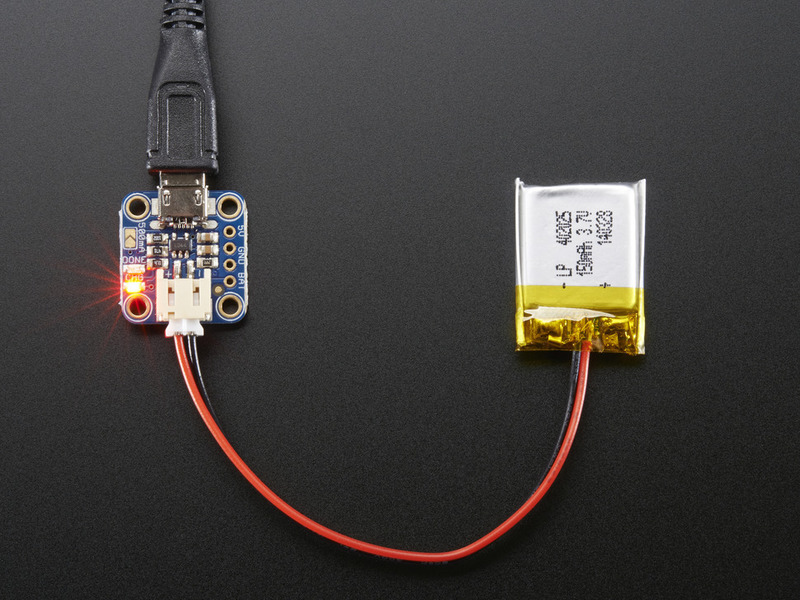
Use an original manufacturer-recommended or compatible certified charger, ensuring that the output voltage, current, connector, and battery specifications (voltage/number of cells) match. For multi-cell batteries (most drones use Li-Po/Li-ion), balance charging should be used to ensure consistent voltage across all cells. Failure to do so may result in the battery pack refusing to charge or becoming damaged.
If possible, try charging with a different cable or a compatible charger to rule out charger or cable issues. In some cases, what appears to be a "battery problem" is actually a faulty charger.
3. Consider Battery Protection Circuit and Internal Battery State
Modern drone lithium batteries typically have a built-in Battery Management System (BMS)/protection circuit. When the battery is in an unsafe state—such as over-discharge, overheating, low temperature, unbalanced cell voltage, or severe aging—the protection circuit may prevent charging to avoid danger.
Some common problems and symptoms:
Over-discharge/Prolonged storage at 0% charge: If the battery is left idle at extremely low charge for an extended period, the protection circuit may "lock" charging, preventing it from charging.
Imbalanced or damaged individual cells: For multi-cell batteries, if one or more cells are severely weakened or damaged, the entire battery pack may fail to charge properly, or even if it does charge, it may quickly fail.
Battery aging/high-frequency use/physical damage: After many cycles, the battery's internal resistance may increase, its capacity may decrease, and its structure may fatigue, potentially leading to charging failure, reduced range, or even safety hazards.
In this case, even if the charger and connections are working properly, the battery itself may be damaged—some problems are irreparable and require battery replacement.
The impact of environmental and operating conditions on charging
Even if the hardware is fine, certain external conditions can cause charging failure or battery damage.
Battery temperature too high or too low: Lithium-ion/lithium-polymer batteries are very sensitive to temperature. High temperatures can damage the battery; low temperatures increase internal resistance, making charging difficult. The optimal charging temperature is typically between approximately 5°C and 45°C. Exceeding or falling below this range carries risks.
Charging the battery immediately after flight is especially inadvisable—the battery may still be hot, and charging at this time is not only not recommended, but sometimes the device itself will refuse to charge. It is recommended to allow the battery to cool to room temperature before charging.
Avoid charging/storing in humid, high-humidity, dusty, or poorly ventilated environments. Moisture, dust, and corrosive substances can damage the battery or interface, and even cause short circuits.
Always supervise the charging process. Do not leave the battery unattended or near flammable materials/in enclosed spaces. Many drone battery guides recommend using fireproof bags or fire-resistant, non-flammable surfaces for storage or charging.
Proper Charging and Storage Habits
Even if the battery is currently rechargeable and working normally, good management habits should be cultivated to extend battery life and reduce future problems.
✅ Good Charging Habits
Always use a manufacturer-recommended or compatible certified charger/cable, ensuring the voltage, current, and cell count are correct, whether using balance charging or normal charging.
For multi-cell batteries, always use balance charging to ensure that the voltage of each individual cell is equal.
Avoid charging immediately after a flight or while the battery is still hot. Allow the battery to cool to room temperature.
Charge in a well-ventilated, dry, non-flammable, and moisture-free environment. Avoid direct sunlight, high temperatures, rain/humidity, and metal objects that could cause short circuits or damage.
Disconnect the charger promptly after fully charging—do not leave the battery at full charge for extended periods. Many smart batteries automatically stop charging when full, but manually confirming disconnection is still a good practice.
? Good Storage Habits
If you plan to leave the battery idle for an extended period (days, weeks, months)—it's best to store it with a charge level of approximately 40%–60% (or the manufacturer's recommended "storage capacity") beforehand. This slows down chemical degradation and prevents over-discharge.

Store in a cool, dry, and well-ventilated environment, away from direct sunlight, high temperatures, and humidity. The ideal temperature is approximately 15–25 °C.
Regularly inspect unused batteries (e.g., every few months): Check for any abnormalities such as swelling, deformation, damage, unusual odors, or terminal corrosion. If any are found, stop using the battery immediately.
Store batteries in fireproof/anti-static, short-circuit-proof containers or bags, and avoid storing them with hard objects, metals, flammable materials, or damp items.
If all checks fail to charge—Final Troubleshooting
If you have:
cleaned and inspected the connectors;
used the correct, compatible charger/cable and balancing charging method;
ensured suitable environmental conditions, temperature, and humidity;
and the battery still cannot be charged—
then it is very likely that the battery itself or its management circuitry (BMS) has suffered irreversible damage.
In this case, the following steps are recommended:
If possible, use a battery tester or balancing charger to check the voltage of each battery cell. If the voltage of one cell is zero or much lower than the other cells, the battery pack is damaged and almost impossible to repair.
If the battery casing is deformed, bulging, cracked, leaking, has an unusual odor, or is abnormally hot—stop using it immediately. Continuing to use a damaged lithium battery poses a risk of short circuit, fire, and explosion.
Contact the battery or drone manufacturer/distributor/professional after-sales service to find out if it is still under warranty or if there is a "scrapping/replacement service." Many manufacturers strongly recommend against attempting to "repair" or "continue using" such damaged batteries; instead, dispose of them safely and replace them.
Why are lithium batteries so sensitive—Understanding basic chemistry and risks
Lithium-ion/lithium polymer batteries are widely used in devices such as drones due to their lightweight and high energy density. However, their chemical properties also make them highly sensitive to improper use, extreme environments, and incorrect charging methods. Careless handling can damage the battery or even cause safety accidents.
Many drone batteries use a multi-cell series design. Damage to one cell or voltage imbalance can cause the entire battery pack to fail.
Lithium batteries are sensitive to temperature, overcharging, over-discharging, short circuits, and physical damage. Incorrect operation can lead to internal short circuits, overheating, bulging, leakage, and even combustion/explosion.
To extend battery life and prevent accidents, three key aspects must be addressed: proper charging and discharging methods, suitable storage environment, reasonable usage frequency, and regular maintenance.
In short, while lithium batteries bring high performance to drones, they also require users to pay close attention to battery maintenance.