
 EN
EN
1. Вступ
У сучасних безпілотних авіаційних системах (БАС) акумулятор більше не є пасивним енергетичним резервуаром, а представляє собою високопідключену кіберфізичну підсистему. Сучасні розумні акумулятори містять мікроконтролери, багаторівневі схеми захисту та алгоритми діагностики в реальному часі, які спільно регулюють потік енергії та забезпечують експлуатаційну безпеку. Однак зростання інтелектуальності також породжує нові режими відмов. За певних аномальних умов — наприклад, при зависанні прошивки, помилкових показаннях датчиків або активації захисних блокувань — акумулятор може стати нечутливим.
У цих сценаріях кнопка живлення виступає критичним інтерфейсом для запуску жорсткого скидання — процедури, що примушує внутрішню систему управління акумулятором (BMS) перезапуститися. У цій статті наводиться академічний аналіз механізмів, обґрунтування та експлуатаційних аспектів жорсткого скидання за допомогою кнопки живлення, з особливим акцентом на їх застосовність у поширених архітектурах «розумних» акумуляторів.
2. Архітектура «розумних» акумуляторів для дронів
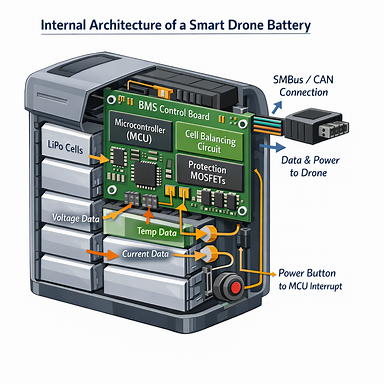
«Розумні» акумулятори інтегрують електричні, обчислювальні та компоненти системи безпеки в єдиний модуль. Їх внутрішня архітектура зазвичай включає:
● Мікроконтролер системи управління акумулятором (BMC)
Виконує прошивкові процедури, контролює стан системи та забезпечує взаємодію з дроном.
● Колії моніторингу та балансування елементів
Забезпечують однакову напругу на всіх елементах, щоб запобігти передчасному старінню.
● MOSFET-ключі захисту та драйвери затворів
Забезпечують захист від перевантаження, перезаряджання та короткого замикання.
● Система температурного контролю
Забезпечує термічну стабільність під час заряджання та розряджання.
● Алгоритми визначення стану заряду (SOC) та стану здоров’я (SOH)
Оцінюють залишкову ємність та довготривалий стан акумулятора.
Оскільки ці компоненти працюють під керуванням прошивки, тимчасові логічні несправності або захисні блокування можуть призвести до зависання системи. Примусове перезавантаження за допомогою кнопки живлення перезапускає мікроконтролер (MCU) і очищає тимчасові помилкові стани.
3. Умови, за яких потрібне примусове перезавантаження
Примусове перезавантаження зазвичай потрібне, коли BMS переходить у аномальний або захисний стан. Поширені причини включають:
3.1 Зупинка виконання прошивки
Неочікувані переривання в роботі прошивки можуть призвести до того, що мікроконтролер припинить реагувати на дії користувача або сигнали зарядного пристрою.
3.2 Хибні захисні позначки
Перешкоди, тимчасові провали напруги або аномалії датчиків можуть неправильно активувати захист від перевищення струму або температури.
3.3 Глибокий сон або блокування при низькому напрузі
Коли напруга елемента наближається до критичних значень, система управління батареєю (BMS) може вимикати звичайну активацію, щоб запобігти пошкодженню.
3.4 Збої у зв’язку з дроном
Контролер польоту може повідомляти про помилки, такі як «Помилка зв’язку з акумулятором» або «Несумісні пакети даних», що вказує на несправність BMS.
3.5 Нестабільність після оновлення
Якщо оновлення прошивки було перервано, акумулятор може «заморозитися» в невизначеному стані.
У цих випадках кнопка живлення є єдиним зовнішнім механізмом, здатним примусово виконати перезавантаження на рівні системи.
4. Механізм жорсткого скидання за допомогою кнопки живлення
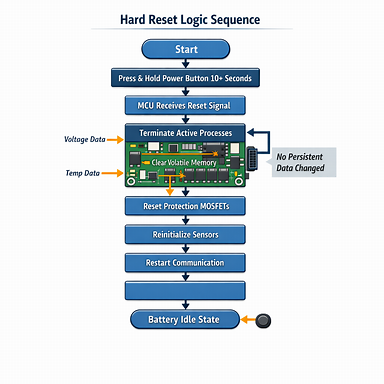
Кнопка живлення підключена до мікроконтролера (MCU) через лінію переривання або пробудження. У звичайному режимі роботи короткі або тривалі натискання активують попередньо визначені процедури прошивки. Однак при утриманні кнопки протягом тривалого часу (зазвичай 8–15 секунд) ініціюється примусове вимкнення та послідовність перезавантаження.
Внутрішні дії під час жорсткого скидання включають:
● Завершення всіх активних потоків прошивки
● Очистка регістрів оперативної пам’яті
● Скидання станів затворів захисних MOSFET-транзисторів
● Повторна ініціалізація вибірки АЦП для вимірювання напруги та температури
● Перезапуск протоколів зв’язку (наприклад, SMBus, CAN, UART)
Цей процес не змінює постійні дані, такі як кількість циклів, таблиці калібрування або метрики SOH.
5. Узагальнена процедура жорсткого скидання
Хоча конкретні реалізації відрізняються залежно від виробника, наведена нижче процедура є загальноприйнятою:
1. Вийміть акумулятор із літального апарату, щоб запобігти непередбаченій подачі живлення.
2. Огляньте акумулятор на предмет набухання, витоку або термічних аномалій.
3. Натисніть і утримуйте кнопку ввімкнення протягом 10–15 секунд, доки всі світлодіоди не загаснуть або не спалахнуть короткочасно.
4. Відпустіть кнопку й зачекайте 5–10 секунд для внутрішнього перезавантаження.
5. Виконайте стандартну послідовність ввімкнення (коротке натискання + довге натискання).
6. Повторно підключіть пристрій до зарядного пристрою, щоб перевірити, чи відновлено звичайний процес заряджання.
Ця процедура відновлює функціональність у багатьох випадках, пов’язаних із тимчасовими логічними несправностями.
6. Обмеження жорсткого скидання
Жорстке скидання не може усунути проблеми, що виникли через:
● Клітини, які суттєво розряджені нижче порогового рівня відновлення системи управління батареєю (BMS)
● Фізичні пошкодження, такі як проколи або набухання клітин
● Теплове старіння внутрішніх компонентів
● Постійне пошкодження прошивки
● Втрати ємності, пов’язані зі старінням
Тому скидання слід розглядати як інструмент діагностики та відновлення, а не як універсальний метод ремонту.
7. Міркування щодо безпеки
Перед виконанням скидання оператори повинні переконатися у наступному:
● Акумулятор має температуру навколишнього середовища
● Відсутні деформації або витікання
● Акумулятор не був недавно задіяний у ДТП
● Процедуру проводять у місці, віддаленому від легкозаймистих матеріалів
Ці заходи запобігають ризикам, пов’язаним із пошкодженими літій-базованими елементами.
8. Профілактичні заходи для зменшення частоти скидання
Щоб мінімізувати аномалії BMS, користувачі повинні дотримуватися таких практик:
● Підтримувати рівень заряду під час зберігання в межах 40–60 %
● Уникати розряджання нижче 20 % під час звичайних польотів
● Використовувати зарядні пристрої, схвалені виробником
● Зберігати акумулятори в рекомендованих температурних межах
● Оновлювати прошивку лише за умов стабільного живлення та наявності сигналу
● Уникати тривалого зберігання в повністю зарядженому стані
Ці заходи зменшують навантаження як на елементи, так і на прошивку BMS.
9. Висновок
Кнопка ввімкнення/вимкнення «розумного» акумулятора для дронів є критичним інтерфейсом для ініціації жорсткого скидання, що дозволяє системі управління акумулятором (BMS) відновитися після тимчасових несправностей, збоїв у зв’язку та зависання прошивки. Хоча процедура скидання є простою з точки зору користувача, вона запускає складну внутрішню послідовність повторної ініціалізації, яка відновлює робочу стабільність без зміни довгострокових даних акумулятора.
Розуміння базових механізмів, обмежень та аспектів безпеки дозволяє операторам ефективно використовувати цю функцію й забезпечувати надійну роботу дронів. Оскільки технологія інтелектуальних акумуляторів продовжує розвиватися, механізми скидання, можливо, стануть більш автоматизованими, проте кнопка живлення залишатиметься фундаментальним інструментом для відновлення роботи системи.